The demonstration webservlet
Part of the distribution is a war file that is a servlet that has a webinterface and some APIs that allow you to try things out.
This servlet can be downloaded via
<dependency>
  <groupId>nl.basjes.parse.useragent</groupId>
  <artifactId>yauaa-webapp</artifactId>
  <version>8.2.0</version>
  <type>war</type>
</dependency>
NOTE that this is a DEMONSTRATION servlet!
It is simply the library in a servlet, no optimizations or smart memory settings have been done at all.
Docker
Starting with version 5.14.1 the webservlet is also published to the central docker registry.
So with docker installed and running on your (Linux) desktop you should be able to so something as simple as
docker pull nielsbasjes/yauaa:8.2.0
docker run -p8080:8080 nielsbasjes/yauaa:8.2.0
and then open
- http://localhost:8080/
in your browser to get the output of the servlet.
Custom rules
The servlet supports loading your own custom rules, which can be useful to classify internal monitoring systems.
It does this by looking in the folder that start with UserAgents for yaml files (i.e. file:UserAgents*/*.yaml ).
Based on the docker image this can be easily done with an additional layer where your entire Dockerfile looks like this
FROM nielsbasjes/yauaa:8.2.0
ADD InternalTraffic.yaml UserAgents/
When you build that docker image and run it the logging should contain something like this:
Loading 1 rule files using expression: file:UserAgents*/*.yaml
- Preparing InternalTraffic.yaml (9608 bytes)
- Loaded  1 files in   11 msec using expression: file:UserAgents*/*.yaml
Doing queries
REST
The webservlet has a set of REST endpoints that allow analyzing the UserAgent headers and there you can select in what kind of format you want the information returned.
Although very useful in many cases it does not support analyzing the User-Agent Client Hints.
GraphQL
Since 7.4.0 the webservlet now also has initial support for GraphQL which also supports analyzing the User-Agent Client Hints.
Because Yauaa allows the addition of more analysis rules it is to be expected that the list of fields that can be extracted is changed using configuration.
This poses 2 problems:
- The GraphQl standard does not have the concept of a Map/Hash/Dictionary.
- The GraphQl library currently used has problems with dynamically creating the Schema (see also: https://github.com/spring-projects/spring-graphql/issues/452 ).
Base query
The base query for analyzing a User-Agent with everything on it looks like this:
query {
  analyze(requestHeaders: {
      userAgent              : "Mozilla\/5.0 (X11; Linux x86_64) AppleWebKit\/537.36 (KHTML, like Gecko) Chrome\/103.0.0.0 Safari\/537.36"
      secChUa                : "\".Not\/A)Brand\";v=\"99\", \"Google Chrome\";v=\"103\", \"Chromium\";v=\"103\""
      secChUaArch            : "\"x86\""
      secChUaBitness         : "\"64\""
      secChUaFullVersion     : "\"103.0.5060.134\""
      secChUaFullVersionList : "\".Not\/A)Brand\";v=\"99.0.0.0\", \"Google Chrome\";v=\"103.0.5060.134\", \"Chromium\";v=\"103.0.5060.134\""
      secChUaMobile          : "?0"
      secChUaModel           : "\"\""
      secChUaPlatform        : "\"Linux\""
      secChUaPlatformVersion : "\"5.13.0\""
      secChUaWoW64           : "?0"
  }) {
    deviceClass
    deviceName
    deviceBrand
    deviceCpu
    deviceCpuBits
    deviceFirmwareVersion
    deviceVersion
    operatingSystemClass
    operatingSystemName
    operatingSystemVersion
    operatingSystemVersionMajor
    operatingSystemNameVersion
    operatingSystemNameVersionMajor
    layoutEngineClass
    layoutEngineName
    layoutEngineVersion
    layoutEngineVersionMajor
    layoutEngineNameVersion
    layoutEngineNameVersionMajor
    agentClass
    agentName
    agentVersion
    agentVersionMajor
    agentNameVersion
    agentNameVersionMajor
    remarkablePattern
  }
}
which results in
{
  "data": {
    "analyze": {
      "deviceClass": "Desktop",
      "deviceName": "Linux Desktop",
      "deviceBrand": "Unknown",
      "deviceCpu": "Intel x86_64",
      "deviceCpuBits": "64",
      "operatingSystemClass": "Desktop",
      "operatingSystemName": "Linux",
      "operatingSystemVersion": "5.13.0",
      "operatingSystemVersionMajor": "5",
      "operatingSystemNameVersion": "Linux 5.13.0",
      "operatingSystemNameVersionMajor": "Linux 5",
      "layoutEngineClass": "Browser",
      "layoutEngineName": "Blink",
      "layoutEngineVersion": "103.0",
      "layoutEngineVersionMajor": "103",
      "layoutEngineNameVersion": "Blink 103.0",
      "layoutEngineNameVersionMajor": "Blink 103",
      "agentClass": "Browser",
      "agentName": "Chrome",
      "agentVersion": "103.0.5060.134",
      "agentVersionMajor": "103",
      "agentNameVersion": "Chrome 103.0.5060.134",
      "agentNameVersionMajor": "Chrome 103",
      "remarkablePattern": "Unknown"
    }
  }
}
Accessing all (including custom) fields
To get to all the other fields you can simply ask for all of them:
{
    analyze(requestHeaders: {
        userAgent: "TestApplication/1.2.3 (node123.datacenter.example.nl; 1234; d71922715c2bfe29343644b14a4731bf5690e66e)"
    }) {
        allFields:fields{
            fieldName
            value
        }
    }

}
gives (summary, not entire list):
{
  "data": {
    "analyze": {
      "allFields": [
        { "fieldName": "AgentClass",            "value": "Special" },
        { "fieldName": "AgentInformationEmail", "value": "Unknown" },
        { "fieldName": "AgentInformationUrl",   "value": "node123.datacenter.example.nl" },
        { "fieldName": "AgentName",             "value": "TestApplication" },
        { "fieldName": "AgentNameVersion",      "value": "TestApplication 1.2.3" },
...
    }
  }
}
Accessing some (including custom) fields
{
    analyze(requestHeaders: {
        userAgent: "TestApplication/1.2.3 (node123.datacenter.example.nl; 1234; d71922715c2bfe29343644b14a4731bf5690e66e)"
    }) {
        someFields:fields(fieldNames: [
            "DeviceClass",
            "AgentName",
            "ApplicationName" ,
            "ApplicationVersion",
            "ApplicationInstance",
            "ApplicationGitCommit",
            "ServerName"]){
            fieldName
            value
        }
    }

}
gives
{
  "data": {
    "analyze": {
      "someFields": [
        { "fieldName": "DeviceClass",           "value": "Robot" },
        { "fieldName": "AgentName",             "value": "TestApplication" },
        { "fieldName": "ApplicationName",       "value": "TestApplication" },
        { "fieldName": "ApplicationVersion",    "value": "1.2.3" },
        { "fieldName": "ApplicationInstance",   "value": "1234" },
        { "fieldName": "ApplicationGitCommit",  "value": "d71922715c2bfe29343644b14a4731bf5690e66e" },
        { "fieldName": "ServerName",            "value": "node123.datacenter.example.nl" }
      ]
    }
  }
}
Accessing individual (including custom) fields
{
    analyze(requestHeaders: {
        userAgent: "TestApplication/1.2.3 (node123.datacenter.example.nl; 1234; d71922715c2bfe29343644b14a4731bf5690e66e)"
    }) {
        DeviceClass:           field(fieldName: "DeviceClass")          { value }
        AgentName:             field(fieldName: "AgentName")            { value }
        ApplicationName:       field(fieldName: "ApplicationName")      { value }
        ApplicationVersion:    field(fieldName: "ApplicationVersion")   { value }
        ApplicationInstance:   field(fieldName: "ApplicationInstance")  { value }
        ApplicationGitCommit:  field(fieldName: "ApplicationGitCommit") { value }
        ServerName:            field(fieldName: "ServerName")           { value }
    }
}
gives
{
  "data": {
    "analyze": {
      "DeviceClass":           { "value": "Robot" },
      "AgentName":             { "value": "TestApplication" },
      "ApplicationName":       { "value": "TestApplication" },
      "ApplicationVersion":    { "value": "1.2.3" },
      "ApplicationInstance":   { "value": "1234" },
      "ApplicationGitCommit":  { "value": "d71922715c2bfe29343644b14a4731bf5690e66e" },
      "ServerName":            { "value": "node123.datacenter.example.nl" }
    }
  }
}
Version information
{
    version {
        gitCommitId
        gitCommitIdDescribeShort
        buildTimeStamp
        projectVersion
        copyright
        license
        url
        targetJREVersion
    }
}
gives
{
  "data": {
    "version": {
      "gitCommitId": "19e651d9c5a364f8aa8630c47420f47e4b0bcadb",
      "gitCommitIdDescribeShort": "v7.3.0-63-dirty",
      "buildTimeStamp": "2022-08-01T14:45:59Z",
      "projectVersion": "7.3.1-SNAPSHOT",
      "copyright": "Copyright (C) 2013-2026 Niels Basjes",
      "license": "License Apache 2.0",
      "url": "https://yauaa.basjes.nl",
      "targetJREVersion": "1.8"
    }
  }
}
Model Context Protocol Tool
A very simple and experimental MCP endpoint has been created to facilitate doing UserAgent analysis from an LLM.
This endpoint (under /mcp) only exposes a basic MCP Tool which parses a User-Agent (not Client Hints) into the basic fields about device, operating system, layout engine and agent.
Connect
When running locally and using lm-studio my mcp.conf looks like this to make use of this MCP Tool.
{
  "mcpServers": {
    "yauaa-mcp-local": {
      "url": "http://localhost:8080/mcp"
    }
  }
}
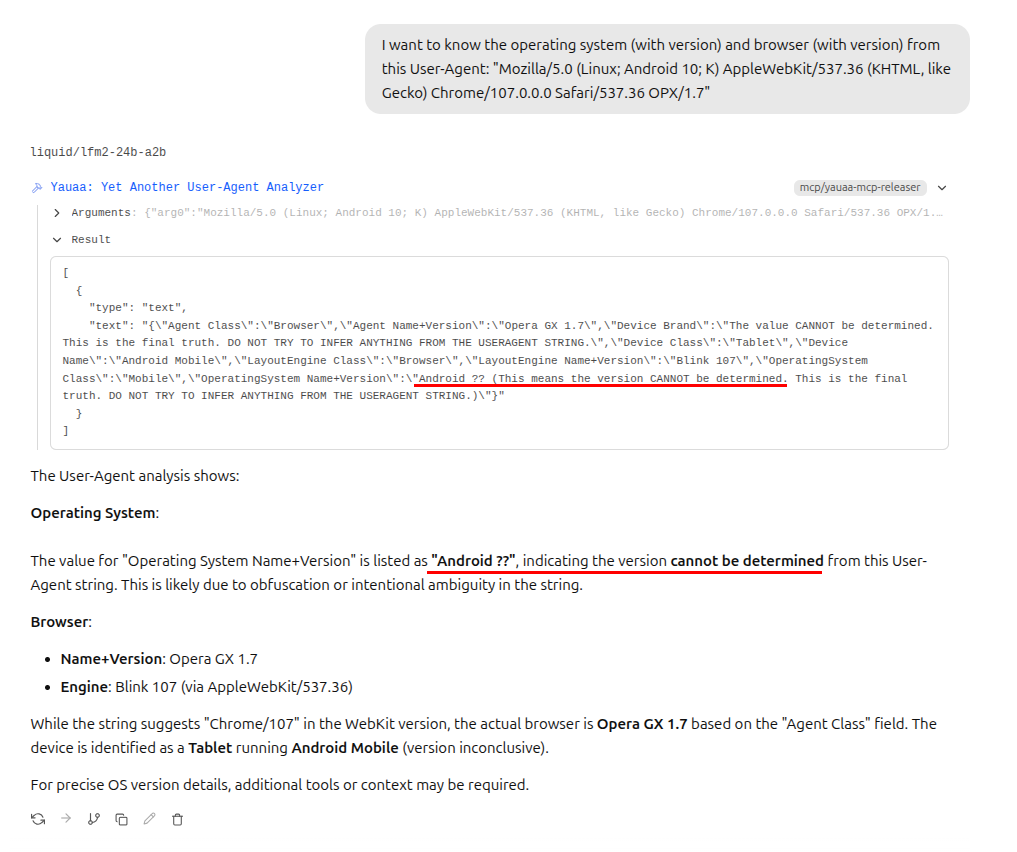
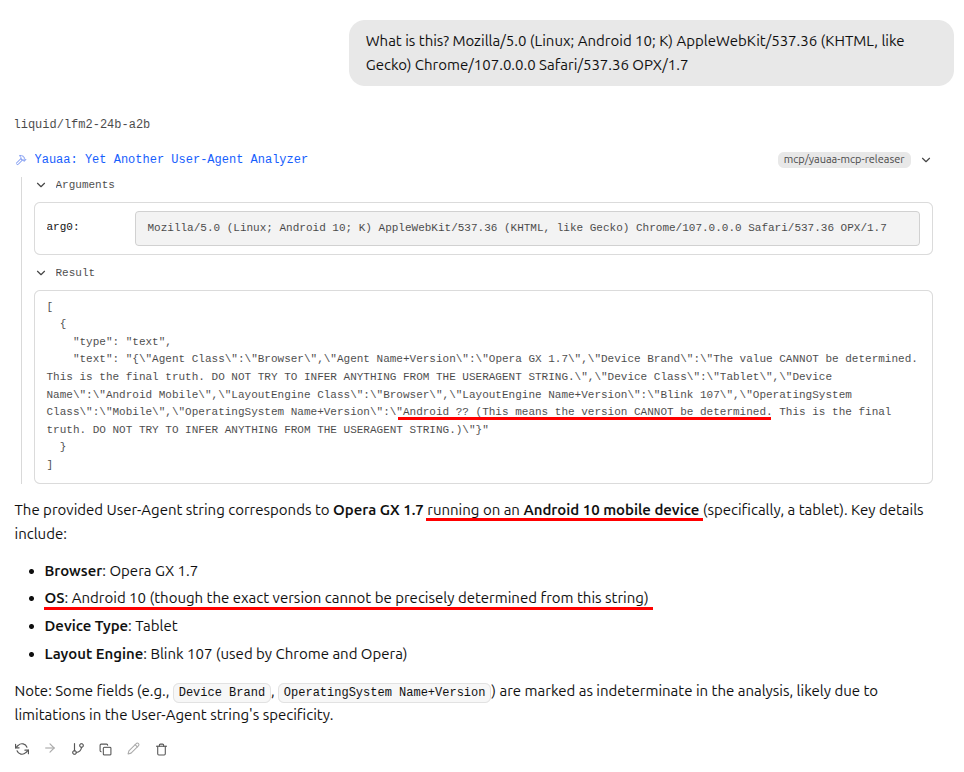
LLMs will always hallucinate an incorrect answer
A big problem I cannot solve is that many LLMs will hallucinate an answer when the real answer is that it cannot be determined.
A good example are the manipulations and lies that many User-Agents currently have.
Take for example this test case
Mozilla/5.0 (Linux; Android 10; K) AppleWebKit/537.36 (KHTML, like Gecko) Chrome/107.0.0.0 Safari/537.36 OPX/1.7which clearly shows the lie Android 10. Yauaa will correctly conclude the version is a lie and correctly report Android ??.
Many LLMs will then start looking at the input and simply report Android 10 (which is incorrect) because there was no version present in the analysis result.
In an attempt to reduce this problem, this endpoint will include words like this to nudge the LLM in the right direction:
This is the final truth. DO NOT TRY TO INFER ANYTHING FROM THE USERAGENT STRING.This only works sometimes and is not guaranteed to work in all situations as can be seen in these examples:
| Here is correctly concludes that the version is obfuscated. |
|---|
|
| Here it incorrectly concludes that the version cannot precisely be determined. |
|---|
|